Pinouts
tinySpeak uses the following tinyCore GPIO pins. These pins are in use whenever the HAT is mounted — avoid assigning them to other peripherals in your own sketches.
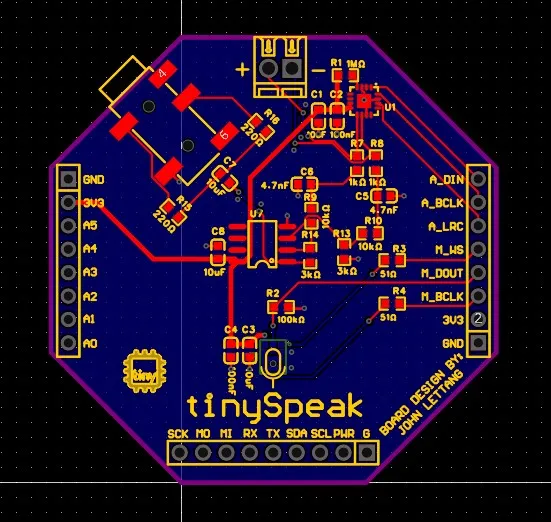
Speaker — MAX98357A (I2S Output)
Section titled “Speaker — MAX98357A (I2S Output)”| Signal | GPIO | Description |
|---|---|---|
| BCLK | 9 | Bit clock |
| LRC | 10 | Left/right clock (word select) |
| DOUT | 8 | Serial data output to amplifier |
Initialize the audio output in your sketch with:
audio.setPinout(9, 10, 8); // BCLK, LRC, DOUTMicrophone — SPH0645LM4H-B (I2S Input)
Section titled “Microphone — SPH0645LM4H-B (I2S Input)”| Signal | GPIO | Description |
|---|---|---|
| SCK | 13 | Bit clock |
| WS | 11 | Word select |
| SD | 12 | Serial data input from microphone |
The SPH0645 requires 32-bit stereo Philips mode via the ESP-IDF I2S driver (i2s_std.h). The demos read both stereo channels and extract only the left channel, shifting the 24-bit data down to 16-bit PCM:
wav_buffer[i] = (int16_t)(raw_samples[2 * i] >> 14);Headphone Jack — TLV9062 (Analog Output)
Section titled “Headphone Jack — TLV9062 (Analog Output)”The 3.5mm jack is driven by the TLV9062 dual op-amp and provides an analog headphone output. This is a separate signal path from the speaker amplifier — no firmware configuration is required. Disconnect the speaker if you want clean headphone-only playback.
Optional Button (Active-Low)
Section titled “Optional Button (Active-Low)”| Signal | GPIO | Description |
|---|---|---|
| BTN | RX | Active-low, internal pull-up enabled via INPUT_PULLUP |
The button is wired between the RX pin and GND. See Adding the RX Button in the Overview for assembly details.
Reserved Pins Summary
Section titled “Reserved Pins Summary”| GPIO | HAT Function | Notes |
|---|---|---|
| 8 | Speaker DOUT | I2S TX data to MAX98357A |
| 9 | Speaker BCLK | I2S TX bit clock |
| 10 | Speaker LRC | I2S TX word select |
| 11 | Mic WS | I2S RX word select |
| 12 | Mic SD | I2S RX data |
| 13 | Mic SCK | I2S RX bit clock |
| RX | Button (optional) | Active-low, internal pull-up |
All other tinyCore GPIO pins remain available for your own use when the tinySpeak HAT is mounted.